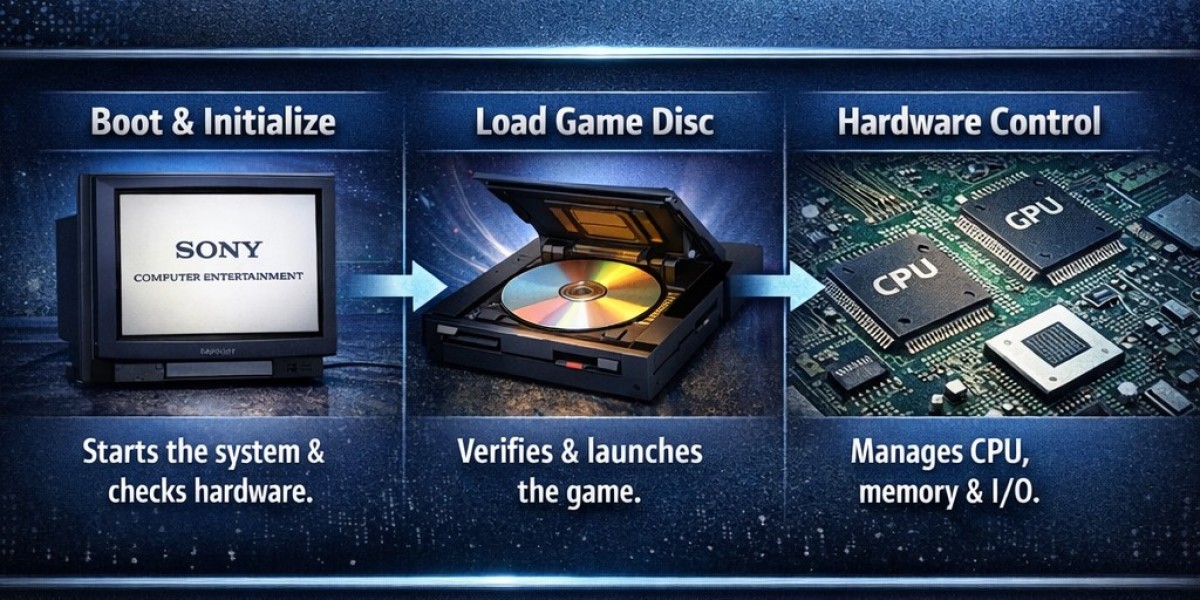
Many gamers and emulator users hear the term “PS2 BIOS” but don’t really understand what it does. When a game fails to load or an emulator shows an error, the BIOS is often mentioned, yet its actual function remains unclear. This confusion leads to setup mistakes, compatibility problems, and frustration for beginners who just want their PlayStation 2 games to run smoothly.
The solution is to break the topic down in simple technical terms without overwhelming jargon. Once you understand what the BIOS does during startup and how it connects hardware and software, everything becomes easier. For those who want detailed guides about BIOS behavior in emulation and system setup, resources like https://ps2biosonline.com/ explain the process in a practical and beginner-friendly way.
What Is the PS2 BIOS?
Basic Definition
BIOS stands for Basic Input/Output System. In the PlayStation 2, it is a small but essential program stored on a chip inside the console’s motherboard. Its main job is to start the system and prepare it to run games or applications.
Unlike regular software, the BIOS is embedded into the hardware. It runs before anything else on the system. Without it, the console would not know how to initialize its components.
What Happens When You Turn On a PS2?
Step 1: Power Activation
When you press the power button, electricity flows to the motherboard. The CPU immediately looks for instructions from a fixed memory location. This is where the BIOS code is stored.
The BIOS becomes the first program to execute. It acts like the system’s starting manager.
Step 2: Hardware Initialization
The BIOS checks and activates core hardware components. This includes the CPU, RAM, graphics processor, disc drive, and memory card ports. If any hardware fails to respond properly, the system may freeze or display an error.
This stage ensures that the console is stable enough to continue the boot process.
Step 3: System Configuration
After confirming the hardware works, the BIOS loads system settings. These settings include language preferences, date and time, and memory card access. This is why you see the PS2 menu screen before launching a game.
The Role of BIOS in Game Loading
Reading the Game Disc
Once hardware is ready, the BIOS communicates with the disc drive. It checks whether a valid PlayStation 2 game disc is inserted. If it detects a compatible disc, it verifies the data structure.
This process prevents unsupported or corrupted files from loading.
Security Verification
The PS2 BIOS also plays a role in security. It checks for region codes and verifies that the disc is authentic. This is one reason why games from different regions may not run on certain consoles.
The BIOS ensures that only properly formatted and licensed games are executed.
Transferring Control to the Game
After verification, the BIOS hands control over to the game’s executable file. At this point, the game begins running independently, though it still relies on system-level communication for hardware interaction.
How the PS2 BIOS Interacts with Hardware
CPU Communication
The BIOS contains instructions that guide how the CPU processes early system commands. It defines how data flows between memory and processing units.
This early setup stage is critical for system stability.
Memory Management
Before a game runs, memory must be allocated properly. The BIOS ensures RAM is cleared and ready. It also manages how system data is temporarily stored during startup.
Efficient memory preparation prevents crashes during the loading phase.
Graphics and Audio Initialization
The BIOS activates the Graphics Synthesizer and sound processors. These components handle visual rendering and audio output. Without BIOS initialization, the console would not display images or produce sound.
Why the PS2 BIOS Is Required for Emulation
Replicating Original Hardware Behavior
When you use a PS2 emulator on a PC, the emulator imitates the hardware. However, it still needs the BIOS to replicate the original console’s startup behavior. The BIOS ensures that games run as they would on real hardware.
Without it, the emulator lacks essential system-level instructions.
Compatibility and Accuracy
Different BIOS versions may slightly affect compatibility. Some games perform better with certain regional BIOS files. This is because the BIOS contains region-specific configurations and timing instructions.
Accurate emulation depends heavily on having the correct BIOS environment.
Technical Components Inside the PS2 BIOS
Kernel Functions
The BIOS includes a small operating system kernel. This kernel manages system calls, memory access, and hardware instructions. It provides a structured way for software to communicate with the console.
This makes the PS2 more organized internally than many people realize.
Input/Output Control
Controllers, memory cards, and USB ports rely on BIOS-level instructions. The BIOS ensures that input signals are recognized before the game takes control.
This is why the controller works even in the system menu.
File System Support
The PS2 BIOS understands how to read the disc’s file structure. It identifies executable files and loads them correctly. This allows the console to transition smoothly from the menu screen to gameplay.
Common Misunderstandings About PS2 BIOS
“It’s Just a File”
Many people think the BIOS is just another file like a game ROM. In reality, it is system-level code embedded in hardware. It plays a foundational role rather than a content-based role.
“It Updates Like Modern Firmware”
Unlike modern consoles, the PS2 BIOS was not designed for frequent updates. It remains largely fixed within the hardware version of the console.
“It Only Matters for Emulators”
While BIOS is essential for emulators, it is equally important for the physical console. The real PS2 cannot function without it.
How BIOS Versions Differ
Regional Differences
There are BIOS versions for Japan, North America, and Europe. Each contains region-specific settings and security checks.
These differences affect which discs can run on certain systems.
Hardware Revisions
Later PS2 models may include minor BIOS revisions. These revisions sometimes improve stability or compatibility. However, the overall structure remains consistent.
Why Understanding the BIOS Is Useful
Understanding how the PS2 BIOS works helps you troubleshoot problems. If a game fails to boot, the issue might relate to system initialization rather than the game itself.
It also helps emulator users choose the correct configuration. Knowing what happens during startup makes technical settings less intimidating.
Finally, it builds a deeper appreciation for how well-engineered the PlayStation 2 was. Even though it launched in 2000, its startup architecture remains impressively structured.
Final Thoughts
The PS2 BIOS is the silent foundation of the entire console. It powers on the hardware, verifies game discs, manages memory, and ensures smooth communication between components.
While it operates behind the scenes, its role is critical. By understanding the startup sequence and technical flow, you gain clearer insight into how both real consoles and emulators function.
Learning these basics removes confusion and makes setup, troubleshooting, and system optimization much easier for anyone exploring classic PlayStation 2 gaming.