Hey! Are you struggling with the issue on your website with Cumulative Layout Shift? Or you don’t even know what is about Cumulative Layout Shift?
Let tell you in short that Cumulative Layout Shift is one of the part of Google’s Core Web Vitals metrics.
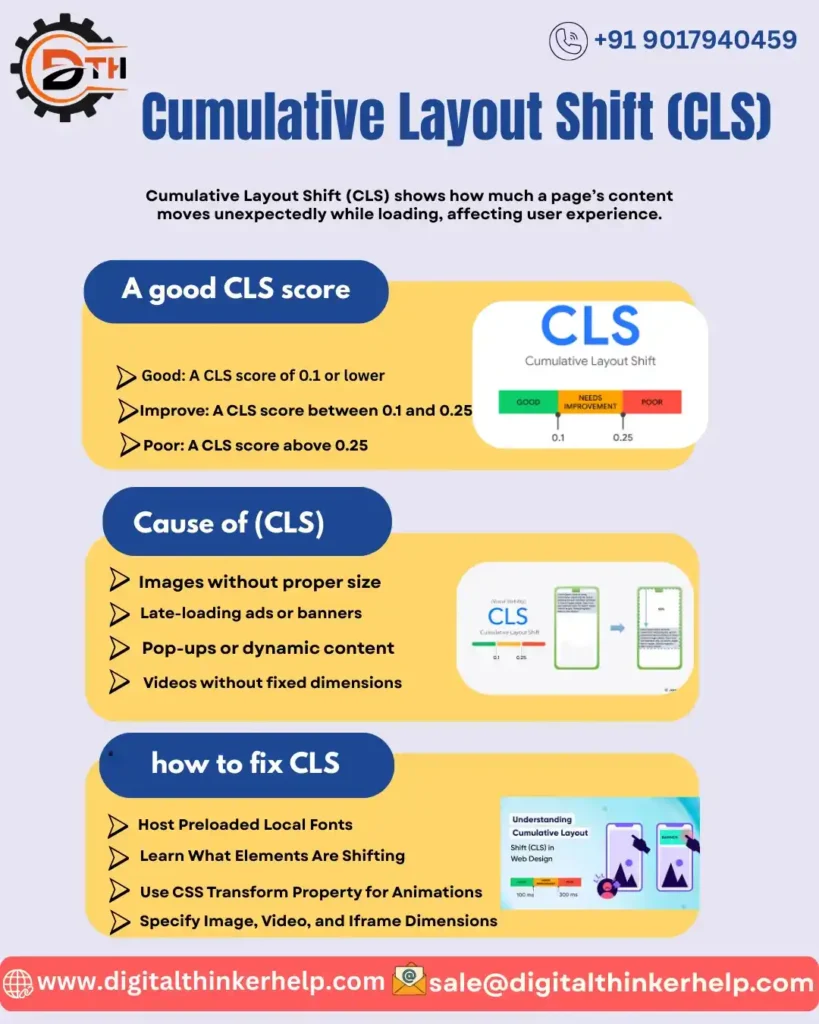
In another words we say it measures how unexpectedly a webpage’s content shifts or loading. A high CLS score can create a poor experience of user and also effect bad on search engine ranking.
We will guide you in this article everything that you should know about What is Cumulative Layout Shift and how it affect the WordPress sites and the web in general.
What Is Cumulative Layout Shift in SEO? Meaning
While a user scrolling or interacting on the page CLS unexpectedly shifts the webpage elements on a page.
This shift is mainly because of the elements like in fonts, images, videos, contact, forms and buttons etc. are loading late.
It creates a frustrating experience of the user when a page keep moving.
If you have a poor CLS score like above 0.1 usually points to coding issues that can be fixed.
What is a Good CLS Score?
Google scores Cumulative Layout Shift from Good to Poor based on the experience of users:
Excellent: Must be CLS score of 0.1 or lower
More Improvement: Must be CLS score between 0.1 and 0.25
Worst: Must be CLS score above 0.25
How Do You Measure and Check CLS?
PageSpeed Insights
You have to remember always that PageSpeed Insights analyzes only one URL at a time. It is a free tool given by Google to check the performance of your website including CLS and other Core Web Vitals metrics.
The PageSpeed Insights shows the report as at the top you will see the metrics based on real user data from the past 28 days. At the bottom of the report it shows the lab results from a test run on your website this time. PageSpeed Insights does not only gives you CLS score it all gives you the suggestions to improve it.
Google Search Console (Core Web Vitals Report)
Google Search Console includes a Core Web Vitals report that shows you the details of CLS and other key metrics that are using real-world data from the Chrome users who have agreed to share their browsing data.
The report divides the pages into Good, Needs Improvement and poor with the help of CLS score and other Core Web Vitals metrics. It helps the site owner that which page needs the improvement quickly. It is a advantage of the Google Search Console report is that the trends according to the time and overall impact of CLS on the groups of pages.
Chrome Developer Tools
As Chrome Developer Tools (DevTools) is a set of built-in tools into the Google Chrome that lets the developers to edit pages live and troubleshoot issues. Its Performance panel can be used to check your CLS score and pinpoint to what’s causing layout shifts.
You can see visually by click on the Performance tab and enabling the Web Vitals option that the layout shifts in real time and which elements are shifting.
WebPageTest
We must say that WebPageTest is a powerful tool to measure and analyze the performance of the web pages. It provides you the details of different performance metrics including CLS. The users can tests from different locations and conditions to simulate the real-world usage.
WebPageTest shows how a page loads and identifies where layout shifts happen. It also makes it easy to identify the problem element. It also allows the developers to test the changes and can see its effect on the CLS score.
How to Improve Cumulative Layout Shift? Examples
Here, we will discuss some best practices that you can follow to improve your CLS score:
1. Use a CMS (Content Hub).
First of all, we say that you have to be sure that you are designing with best practices and catch the issues before your site goes live. Especially using a tool that integrates with Google Lighthouse or other diagnostic tools.
2. Specify size attributes for images and videos.
You should set the size attributes for your media rather than let them to set their own height and width. If you set these attributes then browser knows exactly how much space to set aside even when the page is still loading.
3. Understand how ads can influence your layout.
Google publisher tag tells about how much space to reserve for ads.
Always load new content on the below part of the page. Instead of loading content above that can cause a page to shift.
4. Use transitions and animation to provide context around page changes.
Let’s take an example a Read more link that scrolls the user down does not impact CLS because the shift is expected by the user.
What Are Cause of Cumulative Layout Shift (CLS)?
CLS helps us to think outside of the usual time-based metrics, and the Best Web Development Company in India understands how important it is to notice how moving or unstable page elements can annoy users.”
CLS score is highly affected by how many resources a page has and when they load. Here are the main culprits if your CLS score is high:
Web Fonts – there is a difference between default and custom font sizes that is the cause of layout shifts. Showing the content before the web font loads but when the web font appears it moves the elements. So, this makes your CLS score poor.
Opacity Changes – CLS ignores opacity changes. But if you add an element with 0 opacity and then it is moving. It will affect your CLS score.
Ads – Ads can push the main content of your page. The bigger ads cause the bigger shifts that become the reason of poor CLS score.
Carousels – These carousels use animations that are also the reason of CLS problem. The auto playing carousels can cause of the layout shifts.
Infinite Scroll – There are more content you scroll can push things and increase CLS.
Images – large images and slow loading of images are also the reason of layout shifts and high CLS score.
Banners & Other notices – In case the Banners and other notices appears after the page has loaded they can push content around down the score of your CLS.
How to Fix Cumulative Layout Shift WordPress ?
If you’re comfortable with coding then there are plenty of ways to tackle CLS issues in WordPress.
This simple 10-step process can help to fix the WordPress-specific layout shifts on your site.
Learn What Elements Are Shifting
There are some tools like Cumulative Layout Shift Debugger and PageSpeed Insights can pinpoint exactly where the layout shifts does happen. You can also use the Chrome DevTools and turn on the Layout Shift Regions to see the the shifting elements highlighted in blue.
Disable Asynchronous CSS or Use Critical CSS
As noticed that the most cache plugins let you load CSS asynchronously. But this could be reason of FOUC and shift your web fonts. You can fix it in the plugin’s settings to disable CSS delivery.
Host Preloaded Local Fonts
The fonts that are preloaded can slow things down because the browser often shows a fallback font first. A better approach is to host the fonts locallyusing tools like Transfonter or the OMGF plugin. So that, they load faster and reduce layout shifts.
Add Font-Display: Swap to Fonts
There are some particular web fonts that loads very slow and that is depend on their size. If you add font-display:swap to your font’s CSS will ensure your layout doesn’t shift due to FOIT.
If you want to fix a slow loading font you should use String Locator to search for the problematic font and then add &display=swap to your code.
Set Global Font to Mulish in Oxygen Builder
If you’re using Oxygen Build then you can fix CLS issues by opening your stylesheet and adding ‘Mulish’ in the middle of a text’s body like so: body { font-family: ‘Mulish’, Arial; }
Specify Image, Video, and Iframe Dimensions
Simply insert width=”000” height=“000” after the image signifier in the code or width=”000” height=“000 ></iframe> after a video or iframe to ensure your media has enough space.
Use CSS Transform Property for Animations
Animation can be the reason of layout shifts and just setting aspect rations might not help. Here you can use the CSS transform property to transform:translate() instead of using width + height.
Leave Space for Advertisements and Serve Them Properly
Always you should reserve space for ads. Otherwise the advertisements will shift your other content on the page when they eventually load.
Google recommends to reverse space for the largest size advertisement for example: so: <div class=”ad” style=”min-width: 000px; min-height: 050px;”></div>
Install a Lightweight GDPR Plugin
GDPR Cookie Compliance tools are useful for the websites to stay CCPA compliant. Sometimes they cause of Cumulative Layout Shift issues.
You need to use a lightweight GDPR/CCPA to solve the problem of CLS. As the heavy GDPR plugins may stack the elements and shift while loading.
Hard Code Headers and Menus
Your headers and menus could be causing layout shifts on your site. Hard-coding them in CSS help keep things stable and reduce issues. Most page builders cause shifts, but Elementor and Divi handle this better with built-in hard-coding.
Summing Up
As you have seen that the Cumulative Layout Shift (CLS) is a user-focused metric that directly affects your page’s search rankings. It measures how to visually stable a page is while it loads. CLS Score is calculated by looking at the largest burst of layout shifts that happen during the session of a user.
Understanding, debugging and improving CLS is a smart move for targeted page optimization. It happens especially when paired with other user-focused performance metrics. A powerful CLS score means a smoother experience of a user, better SEO and ultimately more leads, conversions and revenue.